
Today we're launching Dynamic Pricing, a new monetization mode that uses live auction outcomes and machine learning to optimize pricing for each eligible ad request.
Manually managing floors requires deciding what prices to set, when to revisit them, and how often to adjust as demand changes. Dynamic Pricing handles those adjustments automatically.
You can switch an eligible ad unit to Dynamic Pricing or start with an A/B test against your existing line items. Your manual configuration stays saved, so you can switch back at any time.
With dynamic pricing, we have seen a sustained bump in our revenue of 8-15%, effortlessly.

Pricing that adapts to demand
Publishers often manage portfolios of apps, each with multiple ad units. Each ad unit can then be segmented by geography, advertising ID availability, session depth, and other factors that affect impression value. The number of pricing decisions grows quickly, while market conditions continually change.
Managing this through manual line items takes a lot of ongoing work. Even then, fixed floors are a blunt instrument that lags the market.
Dynamic Pricing learns from your ad unit's auction outcomes and adjusts its pricing strategy as demand changes. Requests handled by Dynamic Pricing run through a separate multi-round auction, creating opportunities to capture higher bids while allowing lower-priced demand to compete in later rounds.
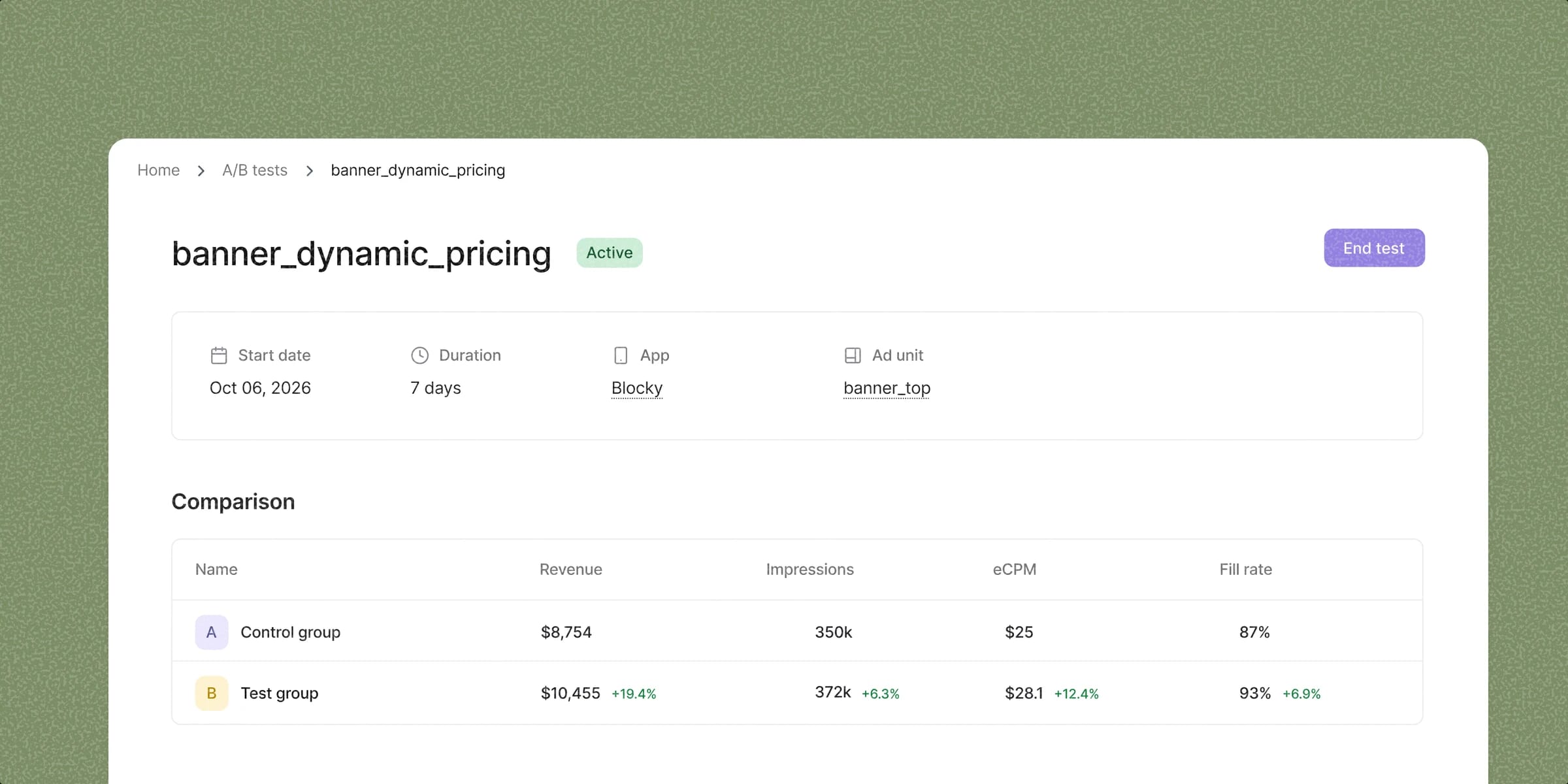
Our A/B test comparison view shows changes in both impression value and fill rate, so you can evaluate the result on your own inventory.
We had been running complex optimization through price-tiered manual line items. Dynamic Pricing still beat that setup in four days: 4.5% more revenue per request, fill went up from 75% to 98%, and nothing for our team to maintain.
Test it on your inventory
Start an A/B test to compare Dynamic Pricing with your current setup. Traffic is split evenly between two concurrent groups:
- Control: your existing line-item setup.
- Test: the Dynamic Pricing auction.
The report compares CloudX revenue per million requests, total revenue, requests, impressions, eCPM, and fill rate.
Revenue per million requests captures changes in both impression value and fill rate.
The statistical significance section shows the estimated revenue lift, its 95% confidence interval, the p-value, and the number of sessions in each group for the selected comparison period. This helps you assess whether the observed difference is reliable.
Choose how each ad unit is priced
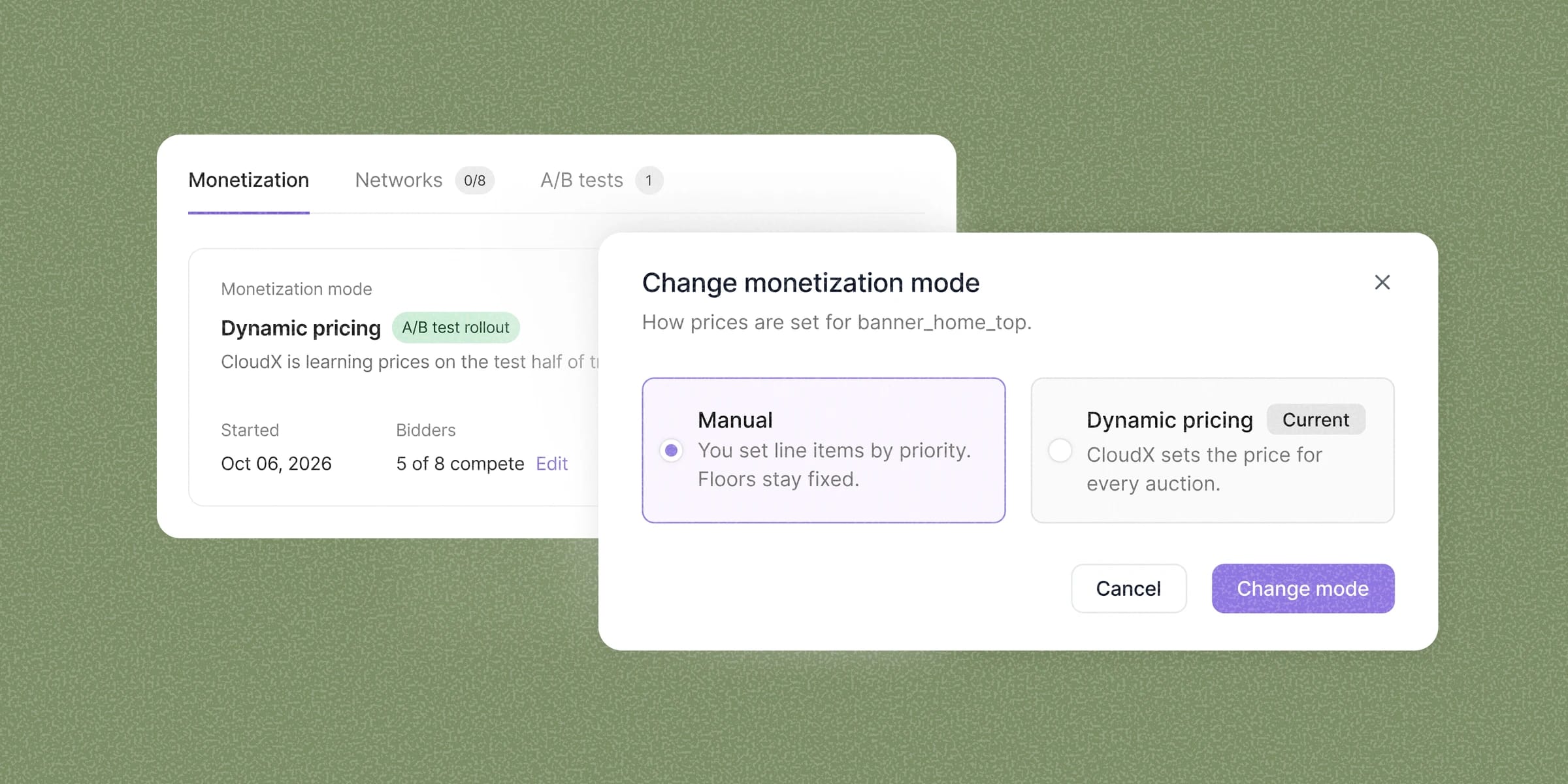
Each ad unit now has a Monetization tab with two modes:
- Manual: you manage your line items and floors.
- Dynamic Pricing: CloudX manages pricing automatically for eligible traffic.
You choose the mode for each ad unit and can switch at any time. Returning to Manual restores your previous line-item configuration.
Getting started
Dynamic Pricing is available starting today on ad units with at least 150,000 eligible auctions per day. It is included for all CloudX publishers at no additional fee. You can view your eligible ad units in the dashboard.
Choose an eligible ad unit, open the Monetization tab, and switch to Dynamic Pricing or start an A/B test. For setup steps, see the Dynamic Pricing guide.
Questions? Contact hello@cloudx.io.

